
Key Takeaways
- The claim that "prompting is dead" took off in June 2026, after OpenClaw creator Peter Steinberger posted on June 7 that developers "should be designing loops that prompt your agents" and Google's Addy Osmani published his "Loop Engineering" essay the same day.
- A loop is a trigger, a goal, a verification step, a stopping rule and a memory, all handed to an agent harness. That's the definition in a June 28, 2026 arXiv paper, which also argues that loops absorb prompt engineering rather than replace it.
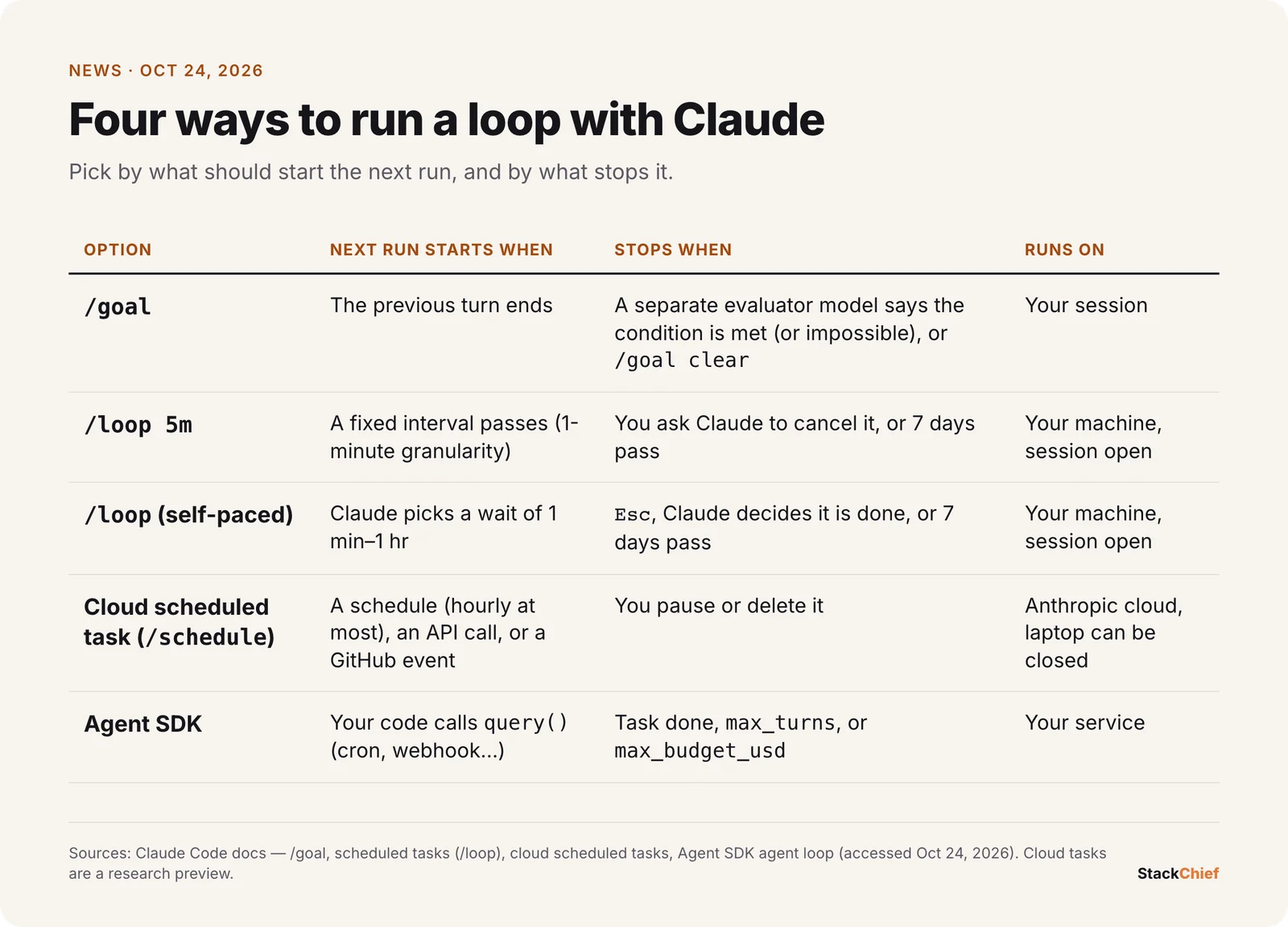
- Anthropic offers four ways to loop with Claude:
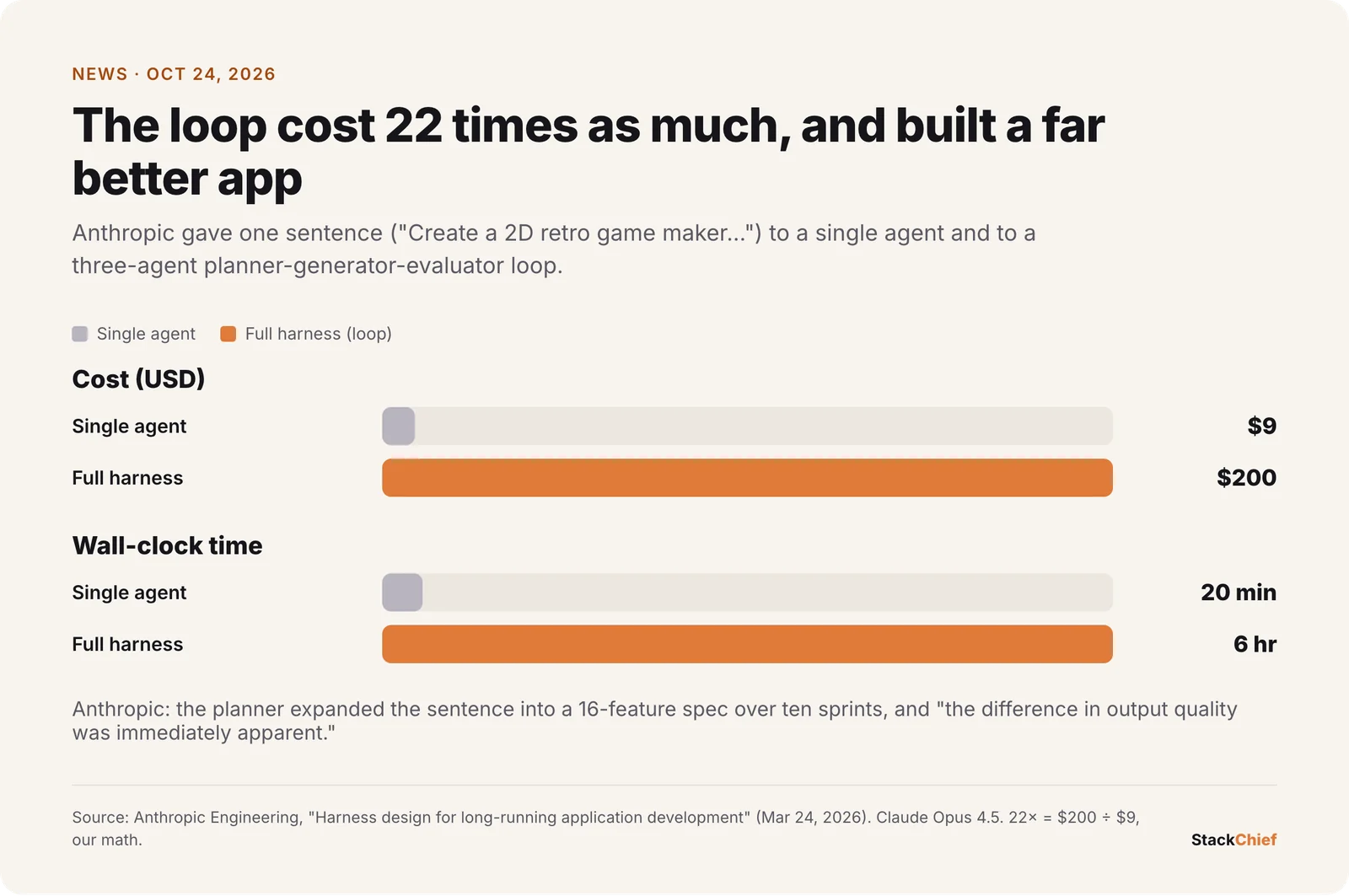
/goal(run until a condition holds),/loop(repeat on a fixed or self-paced interval), cloud scheduled tasks via/schedule, and the Agent SDK for loops you write in code. - Loops cost more. In Anthropic's March 24, 2026 test, a single agent took 20 minutes and $9, while a full planner-generator-evaluator harness took 6 hours and $200, and produced a far better app.
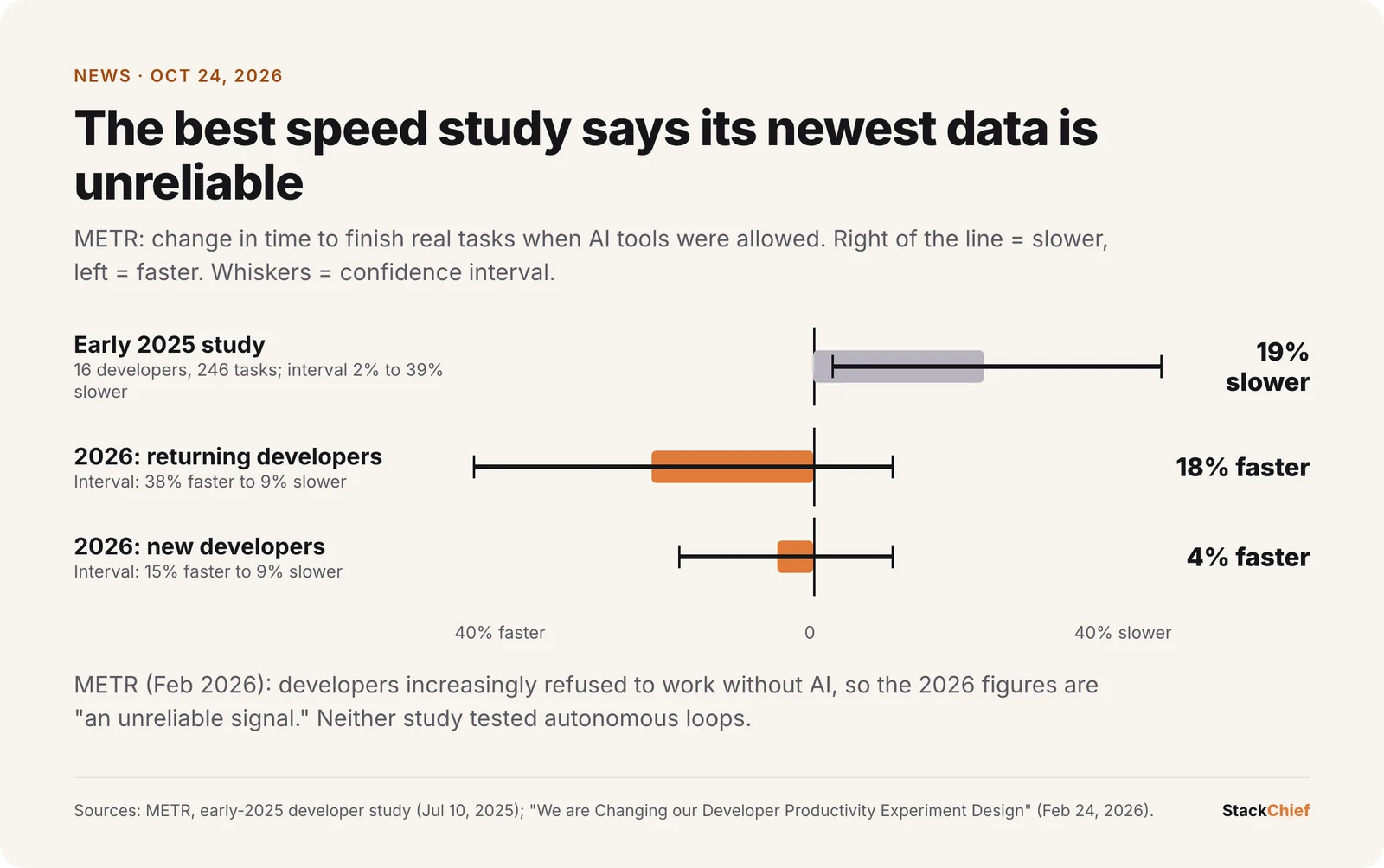
- The productivity evidence is thin. METR's February 24, 2026 update says its newest developer-speed data is "an unreliable signal," and an August 2026 mining study found only 217 confirmed loop repositories out of 36,710 mined.
Loop engineering vs prompt engineering is the argument coding-agent users keep having in 2026. The short version: the people who build these tools say they no longer type prompts step by step. They write systems that prompt the agent for them, check the result and decide what to do next. The headline version, "prompting is dead," is wrong. The underlying change is real, though, and you can try it in Claude Code today with four commands.
What happened
On June 7, 2026, Peter Steinberger, the creator of OpenClaw, posted a "monthly reminder that you shouldn't be prompting coding agents anymore," as The Register reported. That same day Addy Osmani published "Loop Engineering", which gave the practice a name and a parts list. Boris Cherny, who leads Claude Code at Anthropic, told CNBC, "I don't write the prompt anymore," according to Business Insider. "It's an agent that prompts Claude."
Over the next month the idea went from a social-media slogan to the mainstream. Andrew Ng gave it his weekly letter in The Batch on June 26, Anthropic published a getting-started guide on June 30, and Gergely Orosz surveyed about 210 practitioners for The Pragmatic Engineer on July 14. Two arXiv papers followed. Four months on, "prompting is dead" headlines are still circulating, and most of them skip the caveats.
What a loop actually is
Every coding agent already runs a loop inside a single request: it calls a tool, reads the result and decides what to do next, until it stops. Loop engineering works one level up. Sandeco Macedo's June 28 arXiv paper defines a loop specification as five parts a human designs and hands to a harness such as Claude Code or Codex:
| Part | Question it answers | Claude Code example |
|---|---|---|
| Trigger | What starts a run? | A time interval, a GitHub pull request, an API call |
| Goal | What is the run for? | "All tests in test/auth pass" |
| Verification | How do we know it worked? | A test command, a second reviewing agent |
| Stopping rule | When does it end? | Condition met, turn cap, budget cap |
| Memory | What carries over between runs? | A progress file, the issue tracker, the git log |
The idea predates the slogan. In July 2025, Geoffrey Huntley described the "Ralph" technique: a one-line Bash loop that feeds the same prompt file to an agent forever. He was blunt about it, calling it "deterministically bad in an undeterministic world." The 2026 version adds what Ralph lacked: a real stop condition, an independent check and state that survives between runs.
Loop engineering vs prompt engineering: what actually changes
In prompt engineering you are the loop. You read each answer, judge it and type the next instruction. In loop engineering you write that judgment down once, as a goal, a check and a stop rule, so the agent can keep going without you. Osmani's own summary: "The loop changes the work, it does not delete you from it."
The prompt doesn't disappear. It moves. A /goal condition is a prompt, and so is a loop.md file. Anthropic's documentation for cloud scheduled tasks says the saved prompt "is the most important part," because nobody is there to clarify it mid-run. Macedo's paper, which says "we therefore resist the strongest version of the headline," puts it this way: each layer, from prompt to context to harness to loop, "subsumes the previous one rather than discarding it." The skill being retired is babysitting an agent step by step. Writing precise instructions matters more than ever.
How to run loops in Claude, step by step
Claude Code has a built-in option for each kind of trigger. Anthropic's loop guide sorts them into turn-based, goal-based, time-based and proactive. Here is each one, with the commands and limits from the official documentation.
1. /goal: keep working until a condition is true
/goal is the closest thing to "stop prompting." You state an end condition and Claude keeps taking turns until it holds. After each turn a separate small, fast model reads the conversation and returns "not yet met," "met" or "impossible." Because a fresh model decides when the work is done, the model doing the work doesn't get to grade itself.
/goal all tests in test/auth pass and the lint step is clean, no other test file is modified, or stop after 20 turns- Write a condition the transcript can prove. The evaluator doesn't run commands or read files itself. It judges only what Claude has printed, so name the check, for example "
npm testexits 0." - Bound it. Add a turn or time clause like "or stop after 20 turns." Conditions can be up to 4,000 characters.
- Run it unattended by combining it with auto mode, or headless:
claude -p "/goal CHANGELOG.md has an entry for every PR merged this week". - Check and stop it with
/goal(status, turns, token spend) and/goal clear.
2. /loop: repeat on a timer, fixed or self-paced
/loop re-runs a prompt or skill while your session stays open. What you pass decides how it behaves:
| You type | What happens | How to stop it |
|---|---|---|
/loop 5m check if the deploy finished | Fixed interval, converted to a cron job (units: s, m, h, d; one-minute granularity) | Ask Claude to cancel it; Esc doesn't |
/loop check whether CI passed and address review comments | Self-paced: after each pass Claude picks a wait between 1 minute and 1 hour and prints why | Esc while it waits, or Claude ends it when the work is done |
/loop | Built-in maintenance prompt: finish open work, tend the branch's PR, then clean-up passes. A .claude/loop.md file replaces it. | Same as self-paced |
A good rule: use a fixed interval when an outside clock drives the work, such as a nightly report, and self-paced when the work itself sets the rhythm, such as a PR that is busy now and quiet later. Limits to know: recurring tasks expire after 7 days, a session holds up to 50 scheduled tasks, and nothing fires when the terminal is closed. You can pass a skill too, for example /loop 20m /review-pr 1234.
3. Cloud scheduled tasks: loops that run while your laptop is closed
For proactive loops, Claude Code's cloud scheduled tasks (formerly "routines") save a prompt, repositories and connectors, then run them on Anthropic's infrastructure. A task can start on a schedule, on an HTTP POST to its own endpoint, or on GitHub pull request and release events. Create one at claude.ai/code/routines or from the CLI:
/schedule daily PR review at 9am
/schedule in 2 weeks, open a cleanup PR that removes the feature flag
They're available on Pro, Max, Team and Enterprise plans, run at most hourly, and start in auto mode, and each run is a fresh clone that pushes to a claude/ branch. They're still a research preview. One warning from the docs: a green status only means the session didn't crash, not that the work succeeded. Read the transcript.
4. Write your own loop with the Agent SDK
To put a loop inside your own service, the Claude Agent SDK (claude-agent-sdk for Python, @anthropic-ai/claude-agent-sdk for TypeScript) runs the same agent loop as Claude Code. The documentation recommends a budget as "a good default for production agents":
import asyncio
from claude_agent_sdk import query, ClaudeAgentOptions, ResultMessage

async def main():
    async for message in query(
        prompt="Find and fix the bug causing test failures in the auth module",
        options=ClaudeAgentOptions(
            allowed_tools=["Read", "Edit", "Bash", "Glob", "Grep"],
            max_turns=30,          # stop runaway sessions
            max_budget_usd=5.00,   # hard spend cap
        ),
    ):
        if isinstance(message, ResultMessage):
            # "success", "error_max_turns" or "error_max_budget_usd"
            print(message.subtype, message.total_cost_usd)

asyncio.run(main())
Put that call on a cron job or a webhook and you have a proactive loop. For comparison, Huntley's original Ralph was just while :; do cat PROMPT.md | claude-code ; done, with no budget and no stop.
The criticism, and what holds up
The pushback came quickly, and some of it is right. Here are the main objections, with our read of each.
"It's a rebrand of things we already do"
The Register's Thomas Claburn called it "the latest AI buzzword," pointing out that agents already run in loops and that programmers have written loops for decades. Oded Messer, a director of engineering quoted by Orosz, put it more sharply: "Sometimes it feels like AI enthusiasts forgot automation was a thing before LLMs." Partly true. Cron, CI and retry-until-green are old ideas. What's new is putting a nondeterministic model that writes code in the middle of them, which makes verification and stop rules the hard part.
"It's a way to sell more tokens"
Ed Zitron questioned Cherny's advice, calling it "pretty convenient for a guy who's allowed to burn upwards of $130,000 a month in tokens by Anthropic." That figure is Zitron's, not Anthropic's. The cost point stands on Anthropic's own data, though. In its harness experiment, the loop cost 22 times as much as the single agent ($200 vs. $9). The incentive is real, but that doesn't make the advice wrong. The same post shows the expensive loop produced a much better app. The fair question is whether your task is worth 22 times the spend.
"The agent grades its own homework"
Osmani, one of the idea's main promoters, wrote: "The model that wrote the code is way too nice grading its own homework." Self-checking loops can declare victory early, and Macedo's paper warns about reward hacking and fragile model-as-judge checks. Valid, and partly addressed. /goal uses a separate evaluator, but that evaluator only reads the transcript. A loop is only as trustworthy as its checks, so use tests, type checks and builds rather than "looks done."
"You'll stop understanding your own code"
Osmani names two risks: comprehension debt, the growing gap between what ships and what you understand, and "cognitive surrender," designing a loop so you don't have to think. Ng's letter makes the same point from the other side. The human developer loop stays "so long as the human knows something the AI does not." Valid. Even the people pushing the idea list this as the top risk.
"There's no proof it makes teams faster"
Mostly true. METR's 2025 randomized trial found that 16 experienced open-source developers took 19% longer on 246 real tasks with early-2025 AI tools (confidence interval 2% to 39% longer), while believing they were 20% faster. Its February 2026 update suggests a speedup now, but METR calls the new data "an unreliable signal," because developers increasingly refused to work without AI. Neither study measured loops specifically.
Adoption data is thin too. Lulla and colleagues mined 36,710 open-source repositories and confirmed 217 that run autonomous agent loops. That's about 0.6% by our math, and it measures only what reaches public GitHub. They also found that almost none of those repositories commit the state files the guides recommend, so the "memory" part of the definition is mostly missing in practice.
Our verdict
| Claim | Verdict |
|---|---|
| "Prompting is dead" | False. The prompt becomes the loop's spec, and nobody can fix a vague spec mid-run. |
| "Heavy users now design loops instead of prompting each step" | True for tool builders and power users, and the major harnesses now ship the features. |
| "Loops make you more productive" | Unproven. There are good demos and anecdotes, but no controlled study of loops. |
| "It's just a rebrand" | Half true. The pattern is old; the verification problem is new. |
| "It's a token-sales pitch" | The incentive is real, and so are the quality gains on long, verifiable tasks. |
What this means for you
If you use Claude Code every day
- Start with one
/goalon a task with a test-shaped finish line, such as a migration or a flaky-test fix. Add a turn cap. - Use self-paced
/loopto babysit a PR instead of refreshing CI yourself. - Put the loop's knowledge in files, like
loop.mdand skills, and keep them current. Our report on coding agents following stale instruction files shows what happens when those files drift. - Check
/usageafter the first few runs before you make anything recurring.
If you lead a team
- Begin with boring, checkable loops: triage, dependency bumps, docs drift. Anthropic's own advice is "start with the simplest solution."
- Require a deterministic check and a human review gate on anything a loop merges. "Loops that write code need loops that check it."
- Budget explicitly:
max_budget_usdin the SDK, a turn clause in/goal, hourly limits on cloud tasks.
How this connects, and how it comes up in interviews
Loop engineering sits on top of context engineering: a loop is only as good as what the model sees on each pass. That's the thread through our AI engineering hub. It also adds to our data review of whether AI will replace software engineers. Even the loudest promoters say the human sets the goal and owns the verification.
Expect it in interviews for AI-adjacent roles. "How would you let an agent run unattended on this repo?" is a system design question in disguise. A strong answer names the trigger, the check, the stop rule, the budget and the escalation path. We cover how these rounds have shifted in how coding interviews changed in the age of AI, and the fundamentals interviewers still test are in Mastering the Tech Interview.
FAQ
Is prompt engineering dead?
No. What's fading is prompting an agent step by step. The instructions now go into a loop's goal, its checks and its saved prompt, which run without you, so they have to be more precise, not less. Both arXiv papers on the topic, and Anthropic's own documentation, say the prompt remains central.
What is loop engineering?
Loop engineering is designing a system that prompts a coding agent for you. A June 2026 arXiv paper defines it as five parts: a trigger, a goal, a verification step, a stopping rule and a memory. Popular examples include agents that fix new error-tracker issues, triage nightly test failures or babysit pull requests.
What's the difference between /loop and /goal in Claude Code?
/goal starts the next turn as soon as the last one ends and stops when a separate evaluator model confirms your condition is met. /loop starts the next run after a time interval, either one you set (like 5m) or one Claude picks between 1 minute and 1 hour, and it runs until you stop it, the work is done or 7 days pass.
How do I stop a /loop in Claude Code?
For a self-paced loop, press Esc while it's waiting for the next run. For a fixed-interval loop like /loop 5m, Esc won't work, so ask Claude to cancel it, for example "cancel the deploy check loop." Recurring loops also expire on their own after 7 days.
Further Reading
- Claude Code: Run prompts on a schedule: official
/loopreference, with intervals, stopping and limits. - Claude Code: Keep Claude working toward a goal: how
/goaland its evaluator work. - Claude Code: cloud scheduled tasks: triggers, plans and usage limits.
- Anthropic: Loop engineering, getting started with loops: the four loop types (June 30, 2026).
- Addy Osmani, "Loop Engineering": the essay that named the practice (June 7, 2026).
- Macedo, "Stop Hand-Holding Your Coding Agent": the definition and a 50-loop corpus (arXiv, June 2026).
- Lulla et al., "Loop Engineering: Building Blocks, Adoption, and Impact": a repository mining study (arXiv, August 2026).
- Anthropic Engineering: Harness design for long-running apps: the $9 vs. $200 comparison.
- METR: We are changing our developer productivity experiment design: the latest productivity evidence and its limits.
